
Action Required: The browser blocked the connection.
Click the icon next to the URL bar and Allow Private Network Access.
Checking Desktop Connection...
Taskbar Style
Choose the visual style of your Taskbar. Click on "Apply" button to set.
Transparent (line)
Full transparency with line
Transparent (clean)
Full transparency - no line
Buttons (glass)
Glass effect on App Buttons
Buttons (Color)
Colorful App Buttons
Dock panel (glass)
Glass effect on a Dock Panel
Dock panel (Color)
Colorful Dock Panel
Gradient
Single color gradient
Gradient (50-50)
Two color split gradient
Taskbar Effects !
Enable/Disable effects for the Taskbar that triggered with mouse.
Taskbar-highlight effect
The taskbar will be highlighted when you move the mouse over it !
Click-highlight effect
A bursting bubble effect when you click on the taskbar
Mouse Light Shadow - effect
A light shadow behind mouse move
Need Help ?
If you need more help on choosing what to do with the app settings, there is a dedicated space on our website for it
App Settings !
Choose the application settings when you logon to Windows.

Autostart
Select whether the "Transparent Taskbar+ Lite" will autostart when you logon to Windows!
Show Settings on Startup?
Select whether to show the "Settings" window when the app starts.
Need Help ?
If you need more help on choosing what to do with the app settings, there is a dedicated space on our website for it
Transparent Taskbar+ Lite
You are accessing the Application's Settings User Interface from your browser.
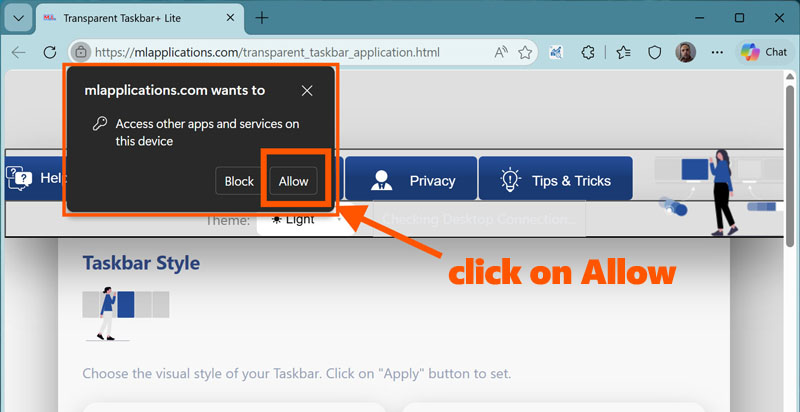
To use the browser's UI, you must accept a permission on your browser to send commands to the application. This is required once.
When prompted from the browser, just click the "Allow" button once. No other actions needed.
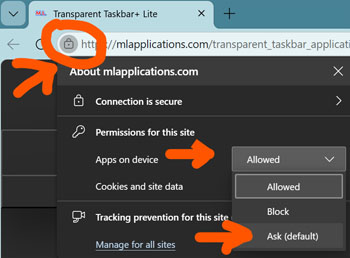
If you accidentally click on "Block" or you want to revoke this permission, you can easily do this:
Transparent Taskbar+ Lite
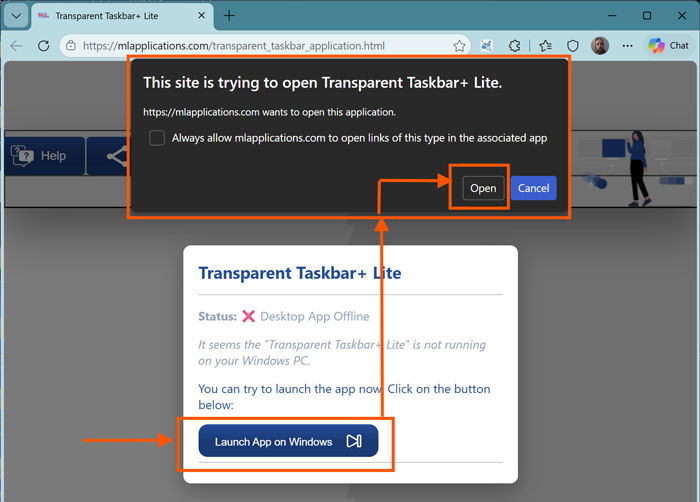
Status: ❌ Desktop App Offline
It seems the "Transparent Taskbar+ Lite application" is not running on your Windows PC.
You can try to launch the app now. Click on the button below:
Example:
Transparent Taskbar+ Lite
Status: ⚠️ Permission Required
You must give permission from your browser to send commands to the "Transparent Taskbar+ Lite application" that is running on your Windows PC.
You can give permission like the example below: Be sure to select the "Allowed":
After that, close this browser tab and restart the application from Windows